Category: Word of the Day & Tools

  • StarDict Dictionaries and the StarDict File Format Explained

    StarDict Dictionaries and the StarDict File Format Explained

    StarDict is a free, open-source dictionary program created by the Chinese developer Hu Zheng, and “StarDict dictionaries” are the word lists saved in its file format: a small set of files ending in.ifo,.idx and.dict. Star Dictionary is an independent words and language reference. It is not the StarDict project. The program and its format are maintained by their own developers elsewhere, and the official information is on the project’s SourceForge site (stardict-4.sourceforge.net) and in its code repository. In November 2026 the format is still widely used, and you can open these files in several programs, including StarDict itself, GoldenDict, KOReader and the command-line tool sdcv. Openly licensed collections such as FreeDict publish dictionaries in this format.

    What a StarDict dictionary is

    A StarDict dictionary is a group of files that share one base name and work together. One file describes the dictionary, one is a sorted index of headwords and one holds the entries themselves. The format is used for monolingual dictionaries, bilingual dictionaries, thesauri and glossaries alike.

    Take a hypothetical English-Spanish word list with the base name “en-es”. It would be stored as en-es.ifo, en-es.idx and en-es.dict.dz, all in the same folder. When you look up “house”, the program finds the word in the.idx file. That entry points to the exact spot in the.dict file where the definition “casa” and its notes are stored.

    The program behind the name is a separate thing from the files. StarDict is a desktop dictionary application. The English Wikipedia entry on it lists its licence as GPL-3.0-or-later, and its stable release as version 3.0.7.1, dated 2 October 2023. Linux distributions mostly ship a 3.0.7 development snapshot. For example, Ubuntu 24.04 “Noble” packages version 3.0.7+git20220909.

    The StarDict file format

    The format has three required parts and one optional part. The project’s own StarDictFileFormat document is the reference for them.

    File Required? What it holds Notes
    .ifo Yes Plain-text information about the dictionary Opens with the line “StarDict’s dict ifo file”, followed by a version of 2.4.2 or 3.0.0
    .idx Yes A sorted list of headwords, each with the position and size of its entry Can be gzip-compressed as.idx.gz
    .dict Yes The text of the entries Usually compressed with dictzip as.dict.dz
    .syn No Synonyms and alternative spellings that point back to main entries Lets a search for one form find another

    The.ifo file

    The.ifo file is the only part you can read in a text editor. It lists details such as the dictionary’s name (the “bookname” field), its word count and the size of the index. Version 3.0.0 also accepts an “idxoffsetbits” option, which allows 64-bit offsets for very large dictionaries.

    The.idx and.dict files

    These two files do the real work. The index has to stay sorted, or lookups fail. The dictzip compression used for.dict.dz files keeps random access, so a program can jump straight to one entry without unpacking the whole file.

    Damaged or non-standard files

    Many StarDict dictionaries that circulate online do not follow the format guide exactly. The StarDict tools package includes a verifier and a repair utility for this reason. A dictionary that opens in one program and fails in another often has a badly sorted index or a wrong word count in its.ifo file.

    Programs that read StarDict dictionaries

    You are not tied to the StarDict program itself. Several actively used tools read the format directly.

    Program Type What it does with StarDict files
    StarDict Desktop application The original reader, developed by Hu Zheng and contributors
    GoldenDict Desktop application Reads StarDict alongside Babylon, ABBYY Lingvo, dictd, Aard, MDict and SDict formats, plus online dictionaries
    KOReader E-reader software Uses StarDict dictionaries for word lookup while you read, on e-ink readers and Android
    sdcv Command line A text-based “console version” of StarDict, maintained by Evgeniy Dushistov, with synonym (.syn) support and JSON output
    PyGlossary Conversion tool Reads and writes StarDict, so you can convert to and from other dictionary formats

    KOReader accepts files ending in.idx,.ifo or.ifo.gz, and.dict or.dict.dz. Its documentation explains where each device keeps its dictionary folder.

    History of StarDict and its dictionary files

    StarDict started in the early 2000s. The copyright notices that Debian ships with the package credit Hu Zheng from 2003. The project grew quickly in the Linux world because it was free, fast and could hold many dictionaries at once.

    Its history also includes several disputes:

    1. Paid downloads (2006). In late 2006 Hu Zheng cited personal financial problems as the reason for charging users to download dictionary files from his website. Many people in the Linux community questioned this.
    2. Copyright complaints. Wikipedia reports that the project was removed from SourceForge after copyright infringement reports, though the article flags that claim as not fully verified. The project later moved to Google Code and then returned to SourceForge.
    3. Questionable dictionary files. Many dictionaries passed around in StarDict format were converted copies of commercial dictionaries, made without the publishers’ permission. Distributions such as Gentoo have raised doubts about whether StarDict dictionaries can legally be redistributed when the source material is copyrighted.
    4. Licence changes. The project’s changelog records the licence moving between GPLv3 and “public domain” around the 3.0.7 releases. Wikipedia currently lists GPL-3.0-or-later.

    Until about 2013, the stardict.org address carried the StarDict project’s website. That address now belongs to Star Dictionary, which has no connection to the software or its developers.

    Where legitimate dictionaries come from today

    The safest way to get StarDict dictionaries is from openly licensed projects. Old file collections are risky because many of them were unlicensed copies.

    • FreeDict publishes more than 140 bilingual dictionaries in about 45 languages, most of them under the GPL. It writes its dictionaries in TEI XML and exports them to StarDict with the help of PyGlossary. It also offers other formats, such as dict and SLOB.
    • Linux distributions such as Debian package FreeDict dictionaries through their normal software channels.
    • Established online dictionaries are a better fit when you want an authoritative English definition rather than an offline file. Merriam-Webster, Oxford and Cambridge all publish dictionaries online. The free Cambridge Dictionary site gives British and American pronunciations, real example sentences and bilingual dictionaries such as English-Spanish.

    The trade-off is simple. Offline StarDict files are fast, private and work without a connection, but their quality depends entirely on where they came from. Publisher websites are kept current and are reliable, but they need a connection and come with the publisher’s terms of use.

    The word itself: “dictionary”

    “Dictionary” (noun, said DIK-shuh-nair-ee in American English and DIK-shuhn-ree in British English) is a reference work that lists words with their meanings. It comes from Medieval Latin dictionarium, a book of words or phrases, built on Latin dictio, “a saying, a word”. A glossary is narrower: a list of terms for one book or field. A lexicon is the full vocabulary of a language or a speaker. A thesaurus groups words by meaning rather than defining them.

    Example: “The app comes with an English dictionary and a medical glossary, but the slang lexicon has to come from somewhere else.”

    FAQ

    Is this site the official StarDict website?

    No. Star Dictionary is an independent words and language reference with no connection to the StarDict software. The project’s official information is on its SourceForge site, stardict-4.sourceforge.net, and in its code repository on GitHub.

    What files make up a StarDict dictionary?

    Every StarDict dictionary needs three files with the same base name: an.ifo information file, an.idx index and a.dict file with the entries, which is often compressed as.dict.dz. An optional.syn file adds synonyms and alternative spellings. If any of the required files is missing, the dictionary will not load.

    Can GoldenDict or KOReader open StarDict dictionaries?

    Yes. GoldenDict reads StarDict files directly, along with formats such as Babylon, Lingvo, dictd and MDict. KOReader uses StarDict as its main dictionary format for looking up words on e-readers and Android devices.

    Are old StarDict dictionary files legal to use?

    It depends on where they came from. Many files shared in the 2000s were converted from commercial dictionaries without permission, so they were never properly licensed. Openly licensed sources such as FreeDict are the clean choice.

    Is StarDict still being developed?

    The program still exists and still ships in Linux distributions. Wikipedia lists version 3.0.7.1 from October 2023 as its stable release, and the project’s changelog records a 3.0.7-2 build from January 2024. Much of the format’s everyday use now runs through other programs, such as GoldenDict, KOReader and sdcv.

    How do you convert a dictionary to or from StarDict format?

    PyGlossary is the best-known tool for this. It reads and writes StarDict as well as many other dictionary formats. FreeDict uses it to produce its own StarDict editions.

    Sources

    • StarDict, Wikipedia
    • StarDict file format, StarDict project on SourceForge
    • StarDict changelog, Hu Zheng’s code repository
    • StarDict format notes, PyGlossary documentation
    • GoldenDict package description, Fedora Packages
    • sdcv manual page
    • FreeDict project
    • Ubuntu stardict package, Launchpad
    • Cambridge Advanced Learner’s Dictionary, Wikipedia
  • How to Look Up a Word in StarDict

    How to Look Up a Word in StarDict

    In StarDict, the free desktop dictionary program, you look up a word by typing it into the Search box. The program shows a definition as soon as it finds a match, and runs a fuzzy query when it can’t find one. This site is Star Dictionary, an independent words and language reference with no connection to the StarDict project. The program is maintained elsewhere by its lead developer, Hu Zheng. Its official pages are on SourceForge, GitHub and GitCode, and the newest stable release listed there is StarDict 3.0.7, from October 2023.

    The steps below come from the StarDict Documentation (windows), the help pages the program’s developers wrote for its Windows build. They are corrected and explained in more detail here. Until about 2013, StarDict’s own website used this address. The current Star Dictionary site is unrelated to that project.

      
    (4.5)  

    StarDict Documentation (windows)

     > 
    Usage

     > 
    Looking Up a Word

    How to look up a definition in StarDict

    To find the meaning of a word in StarDict:

    1. Type the word into the Search box at the top of the main window. It is a combo box, so its drop-down list also holds the words you looked up recently.
    2. StarDict shows the definition right away. If it can’t find the word, press Return (Enter) or click the Fuzzy query button to search for similar words.
    3. Use the scrollbar to read the whole definition. Click a word in the word list to see that entry and nearby headwords.

    Here is an example. You type accomodate, which is a common misspelling. No exact match exists, so you press Return. The fuzzy query then suggests entries with close spellings, and accommodate should be among them. Click it to see the definition.

    What a fuzzy query does

    A fuzzy query looks for headwords that are spelled almost like what you typed. It helps when you misspell a word, have only heard it spoken, or copied it from a scanned page with errors in it. StarDict’s GNOME help describes the Fuzzy Query button simply as running a fuzzy query on the word in the Search field. You get a list of possible matches, not one definite answer, so read the suggestions before you pick one.

    The program’s manual pages list fuzzy query as one of three core features, along with glob-style pattern matching and “scan selection word”. Pattern matching uses wildcards. A question mark stands for one character and an asterisk for any run of characters. That is useful when you know only part of a word, such as its beginning.

    Usage tips

    StarDict Interface Diagram
    • Try the exact spelling first. An exact match loads immediately. A fuzzy query is the fallback for when the exact search fails.
    • Look at the word list. Entries next to your word often include its derived forms and compounds, such as the noun formed from a verb.
    • Use wildcards when you only know part of a word. A pattern search lists every headword that fits.
    • Check more than one dictionary. StarDict shows results from every dictionary you have installed. Definitions vary in quality, so for important uses, compare them with an established dictionary such as Merriam-Webster, Oxford or Cambridge.

    StarDict today: versions and where to find official information

    StarDict is still maintained, but slowly. Its official English page lists version 3.0.7 (“MasterWork”) as released on 3 October 2023 and names Hu Zheng as project leader. The project’s changelog shows a brief license change to public domain in that release, which was reversed to GPLv3 in January 2024. A 4.0.0 source tree on GitCode ports the program to GTK4. Its changelog says the code is almost the same as 3.0.7, and no dated stable 4.0 release is listed.

    Linux distributions often ship an older snapshot. Debian-based systems, for example, package a version labeled 3.0.7+git20220909. Help menus and button names may differ slightly from the steps above, depending on which build you have. For current release notes, bug reports and documentation, go to the project’s own pages, not to third-party mirrors.

    StarDict dictionary files and formats

    StarDict reads dictionaries in its own open file format. Each dictionary is a set of files that share a base name:

    • .ifo: a small text file describing the dictionary (its name, word count and format version, either 2.4.2 or 3.0.0)
    • .idx (or .idx.gz): the sorted index of headwords
    • .dict (or the compressed .dict.dz): the definitions themselves
    • .syn (optional): synonyms that point back to entries in the index

    The format specification is published on the project’s SourceForge site and in its GitHub repository. Text should be stored as UTF-8. Code libraries in Go, Rust and JavaScript can read the format, so the same files can work outside StarDict.

    The source of a dictionary matters. In StarDict’s early years, some files shared online were unlicensed copies of commercial dictionaries. Use dictionaries that are openly licensed, or ones you have the right to use.

    FAQ

    Is Star Dictionary the same as StarDict?

    No. Star Dictionary is an independent website about word meanings, word origins, idioms and translations. StarDict is a separate open-source dictionary program developed by Hu Zheng and other contributors, and its official information is on the project’s SourceForge, GitHub and GitCode pages.

    Why does StarDict say a word is not found?

    Usually the word isn’t in any dictionary you have installed, or it is spelled differently. Press Return or click Fuzzy query to see close spellings. If nothing useful comes up, the installed dictionaries probably don’t cover that word, so check an established dictionary such as Merriam-Webster or Cambridge.

    What is the difference between a fuzzy query and a pattern search?

    A fuzzy query works out which headwords look most like what you typed, which helps with typos. A pattern search uses wildcards that you set yourself (? for one character, * for any run of characters) and lists every headword that fits.

    What is the latest version of StarDict?

    The project’s official page lists StarDict 3.0.7, released on 3 October 2023, as the current stable version. A 4.0.0 source tree with a GTK4 port exists on GitCode, but no dated stable release of it has been announced. Linux distributions often package an earlier 3.0.7 snapshot.

    Which files make up a StarDict dictionary?

    You need at least three files with the same base name:.ifo (information),.idx (index) and.dict or.dict.dz (definitions). An optional.syn file adds synonyms. The full format specification is published by the StarDict project.

    Sources

    • StarDict official English page (SourceForge)
    • StarDict file format specification
    • StarDict 3.0.7 help file (GitCode)
    • StarDict 3.0.7 changelog (GitCode)
    • StarDict 4.0.0 changelog (GitCode)
    • stardict(1) manual page (Debian)
    • StarDict (Wikipedia)
  • StarDict’s Notification Area Icon: What It Does

    StarDict’s Notification Area Icon: What It Does

    On a desktop computer, the notification area icon is the small StarDict symbol that sits next to the clock. You can use it to hide and show the dictionary window, turn word scanning on or off, look up selected text, or quit the program. Star Dictionary is a separate words and language reference with different owners. It is not the StarDict project. StarDict’s own developers maintain the program elsewhere: the project site is stardict-4 on SourceForge and the source code is on GitHub. The latest stable release listed there is 3.0.7.1, dated October 2023.

    The text below comes from the StarDict Documentation (windows) set, which originally followed the Getting Started section. It has been corrected for today’s systems.

      
    (3.3)  

    StarDict Documentation (windows)

     > 
    Getting Started

     > 
    Notification area icon

    What the icon does

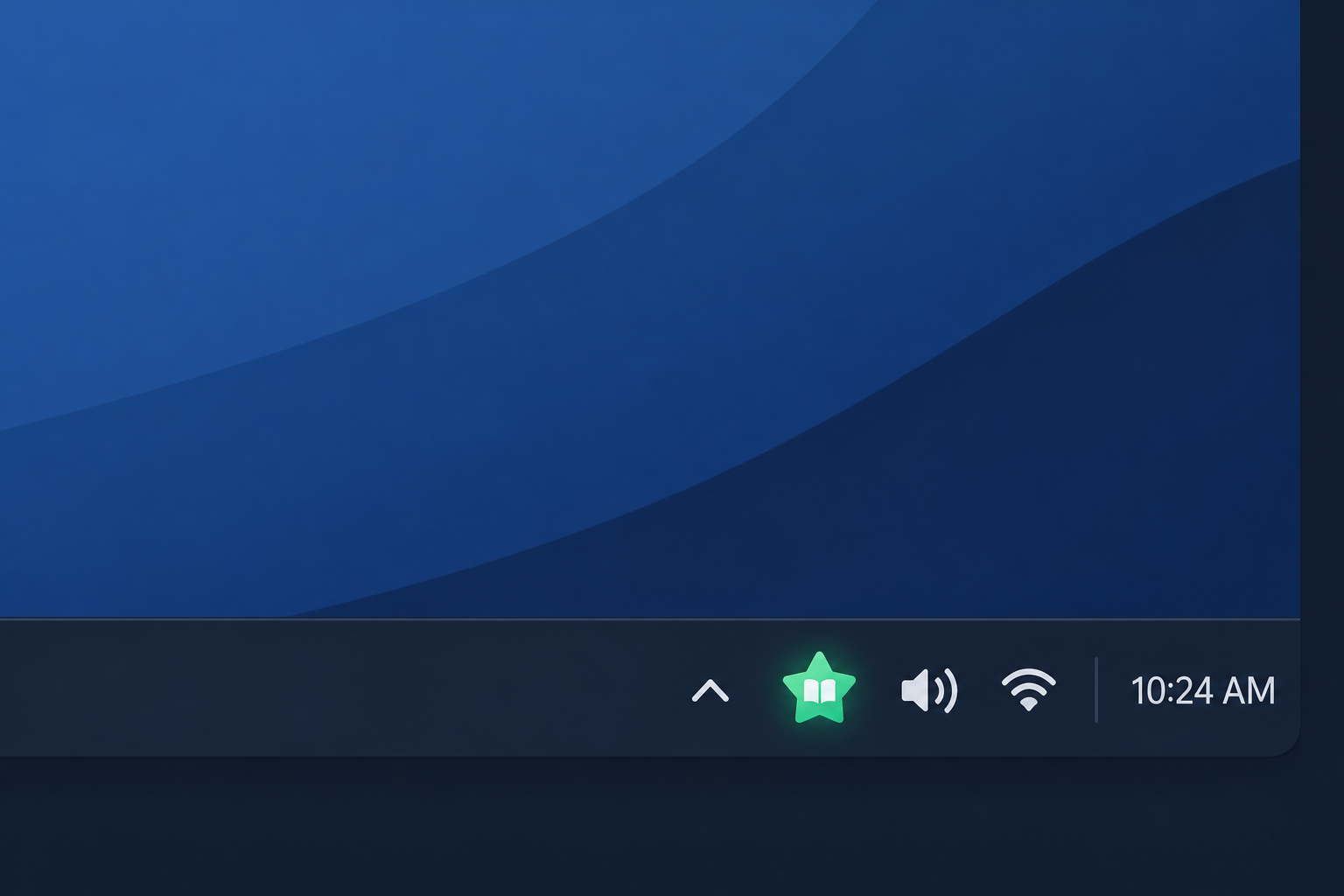
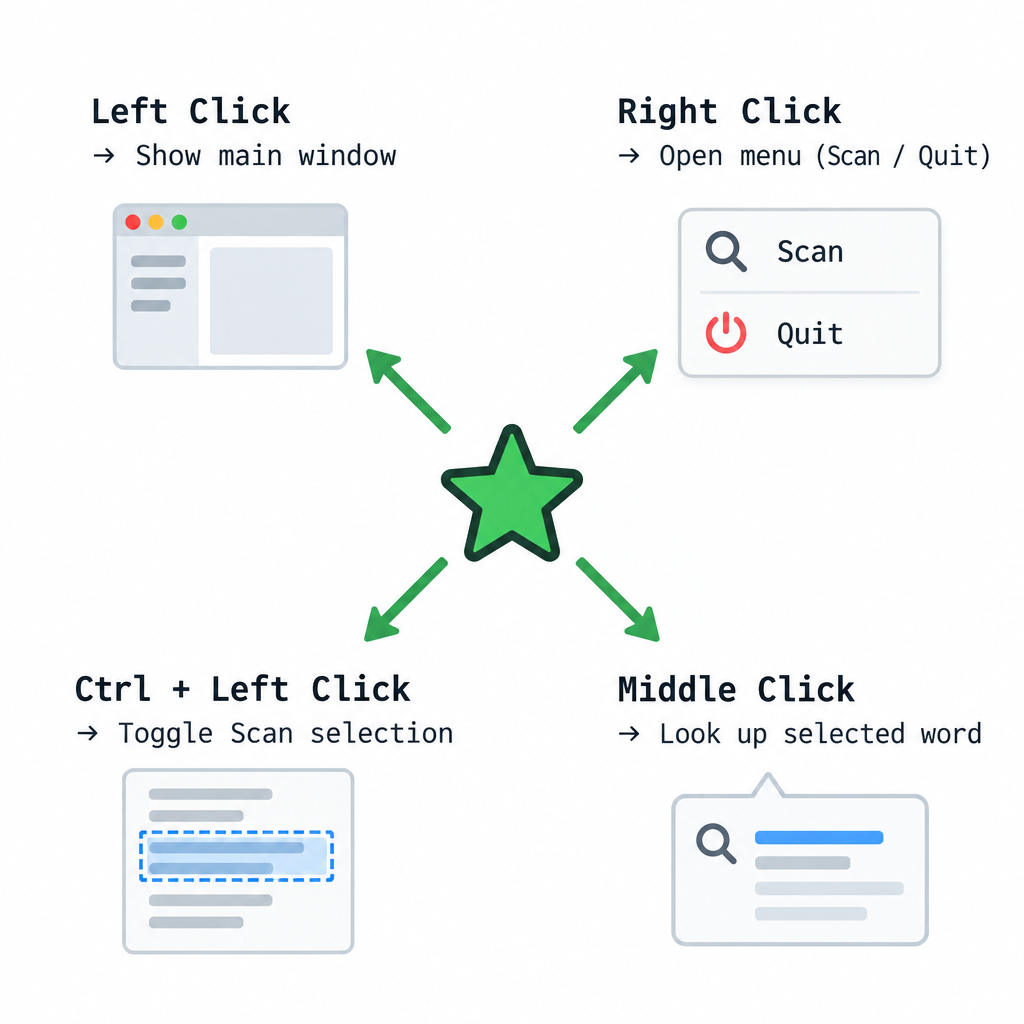
    When StarDict runs, it adds an icon to the notification area. Windows uses that name for the group of small icons beside the clock. Many Linux desktops call it the system tray. Each mouse action on the icon does something different.

    Action on the icon What happens
    Left click Shows the main window again after it was hidden
    Right click Opens a menu where you can turn Scan selection on or off, or Quit
    Ctrl + left click Turns Scan selection on or off directly, without the menu
    Middle click Looks up the word you have currently selected

    Hiding and showing the main window

    If you minimize the main window, StarDict hides it completely, and it no longer appears in the taskbar. The program keeps running in the background. Click the notification area icon once and the window comes back.

    This lets you keep the dictionary running all day without filling your taskbar. For example, you can minimize StarDict while you read a PDF, then click the icon when you need to search for a phrase by hand.

    Turning Scan selection on and off

    With Scan selection turned on, StarDict looks up any word you highlight in another program and shows the result in a small floating window. You can change this setting from the right-click menu or by Ctrl-clicking the icon. The main window also has a Scan selection checkbox that does the same thing.

    The Ctrl-click shortcut is useful when you switch between reading and editing. Leave scanning on while you read a foreign-language article. Turn it off before you start selecting text to copy, so that pop-ups stop appearing over your work.

    Looking up a word with the middle button

    If you middle-click the icon, StarDict looks up the word you have selected, even when Scan selection is off. By default the result appears in the floating window. In StarDict’s settings you can have it shown in the main window instead.

    Why you might not see the icon today

    The documentation was written for desktops that always showed tray icons. Some current systems hide them or leave them out.

    • Windows 10 and Windows 11 often move less-used icons into an overflow area. You open it with the small arrow next to the clock. In the taskbar settings you can choose to keep the StarDict icon always visible.
    • GNOME removed its built-in legacy tray in version 3.26, released in 2017. Tray icons now appear only through extensions, such as the AppIndicator extension or the Status Icons extension that GNOME released in 2024.
    • Wayland sessions limit how a program can read what other programs are doing. A Fedora bug report about StarDict’s scan hotkey on Wayland was closed as “CANTFIX”. If scanning does not work for you on Wayland, an X11 session is more likely to support it.

    StarDict today: program, formats and where official information lives

    Mouse Actions Reference Table

    StarDict is a free, open-source dictionary program, originally written by Hu Zheng. Its developers publish it themselves. On Linux it is also packaged by distributions. For example, Debian 13 “trixie” ships a package built from the 3.0.7 code. Official news, documentation and release notes are on the project’s own pages, not on this site.

    Old guides once told readers to download dictionary files from various sites. Some of those files were unlicensed copies of commercial dictionaries. Today it is better to use dictionaries whose licence is clear: free projects such as Wiktionary-based data, or commercial dictionaries you have paid for through their publisher.

    The StarDict dictionary format

    A StarDict dictionary is a set of files that share the same base name. The format specification on the project’s site describes each one.

    File Purpose
    .ifo Plain-text information about the dictionary, such as its name, word count and format version (“2.4.2” or “3.0.0”)
    .idx The index of headwords and where each entry is stored. It can be compressed with gzip
    .dict or .dict.dz The definitions themselves. The .dz version is compressed with dictzip
    .syn Optional list of synonyms that point to existing entries

    Text in these files is stored as UTF-8, so one format works for any language. Because the format is documented, other programs can read it. These include the GoldenDict dictionary app, the command-line tool sdcv and the e-reader app KOReader.

    FAQ

    Is this site the official StarDict website?

    No. Star Dictionary is an independent reference for word meanings, origins, idioms and translations, run by different owners. The StarDict program has its own developers, who publish their information on the project’s SourceForge site and its GitHub repository.

    Why does the StarDict window disappear when you minimize it?

    That is how StarDict is designed. A minimized window is hidden from the taskbar, and the program keeps running in the notification area. Click the tray icon once to bring the window back.

    How do you turn off pop-up lookups quickly?

    Hold Ctrl and click the notification area icon. This turns Scan selection on or off. You can also right-click the icon and choose Scan selection from the menu, or clear the checkbox in the main window.

    Why is there no StarDict icon on a GNOME desktop?

    GNOME has not shown legacy tray icons out of the box since version 3.26. To see the icon, you need an extension such as AppIndicator or GNOME’s own Status Icons extension. Without one, StarDict still runs, but you have to use its main window.

    What is the latest version of StarDict?

    The latest stable release listed by the project and in Wikipedia’s entry is 3.0.7.1, dated 2 October 2023. Linux distributions may ship a build of the 3.0.7 code with their own patches. Check the project’s pages for any newer release.

    Can StarDict dictionaries be used in other apps?

    Yes. The format is publicly documented, so GoldenDict, sdcv and KOReader can all read .ifo, .idx and .dict files. Make sure the licence of any dictionary you use allows it.

    Sources

    • StarDict project site (stardict-4 on SourceForge)
    • StarDict file format specification
    • StarDict on Wikipedia
    • StarDict 2.4.10 help file (project mirror)
    • StarDict settings schema (project mirror)
    • Debian Package Tracker: stardict
    • Red Hat Bugzilla 1964374: StarDict scan hotkey
    • OMG! Ubuntu: GNOME’s official Status Icons extension
  • Scan selection in StarDict: how the floating window works

    Scan selection in StarDict: how the floating window works

    In StarDict, scanning means the desktop dictionary program watches for text you highlight in any application, looks the text up automatically and shows the result in a small floating window. StarDict is an open-source program maintained by its own developers. The latest stable release listed for it is 3.0.7.1 from 2 October 2023, with source code on GitHub and documentation on the project’s SourceForge site. Star Dictionary is a separate word reference with no connection to the StarDict project. If you want the same pop-up lookup today, you can use StarDict itself or GoldenDict-ng, which reads StarDict-format dictionaries and has its own scan popup.

      
    (3.4)  

    StarDict Documentation (windows)

     > 
    Getting Started

     > 
    Scan selection

    How the scan feature works

    StarDict can scan selections automatically. When you select a word or phrase in StarDict or in any other application, StarDict takes the selected text, searches for it and shows the result in a floating window.

    You can drag the window to move it. The floating window disappears when you move your pointer some distance away from it.

    This page was originally part of the StarDict Documentation (windows), together with a Getting Started page for new users. The behaviour described here comes from the program’s own help manual, which covers the GTK version that runs on both Linux and Windows. Some details can differ between versions and platforms.

    Turning scanning on and off

    You switch scanning on with a check box in the StarDict main window. Once it is ticked, StarDict looks up any word you highlight in any application.

    The notification area icon gives you two shortcuts, according to the StarDict help manual:

    1. Ctrl-click the icon to switch scanning on or off without opening the main window.
    2. Middle-click the icon to look up the currently selected word.

    A setting decides where middle-click lookups appear: in the floating window or in the main window.

    Scanning only while a modifier key is held

    Floating window anatomy diagram

    If the floating window pops up too often, you can make StarDict scan only while a modifier key is pressed. The option is labelled “Only do scanning while modifier key being pressed” in the preferences. You can choose the Win, Shift, Alt or Ctrl key.

    A companion option, “Hide floating window when modifier key is released”, is on by default. It only works when the modifier-key option is also on. With both switched on, the window appears while you hold the key and closes when you let go.

    For a worked example, set the modifier to Ctrl. If you highlight “serendipity” in a web browser, nothing happens. Highlight it again while holding Ctrl and the definition appears next to the pointer. Release Ctrl and the window closes.

    The floating window

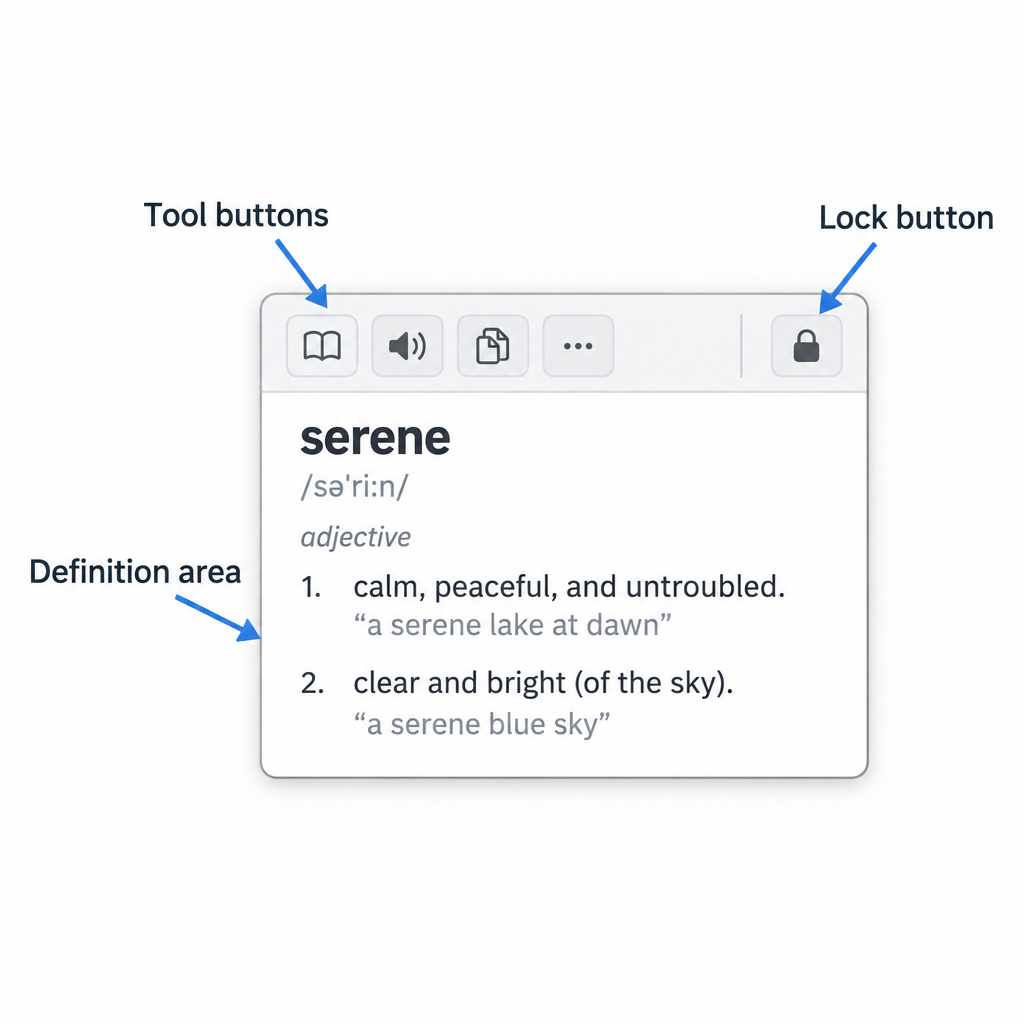
    The StarDict floating window consists of the following elements:

    Tool buttons

    The buttons will be hidden automatically to save display space. When your mouse pointer enters the floating window, the buttons will appear immediately, and disappear again as the mouse pointer leaves.

    You can click these buttons to query a word in the main window, copy the query result to clipboard, pronounce the word, stop selection scanning, etc. To the far right is the Lock floating window button. If the floating window is locked, it will always be shown there.

    Definition area

    The query result is displayed in this area.

    The help manual adds a few details about how the window behaves:

    • Tool buttons hide automatically. This saves screen space. They come back when the pointer enters the window.
    • Lock. A locked window stays open when the pointer moves away, and StarDict remembers its position on screen.
    • Pronunciation. A setting can make StarDict speak the word as the window appears. Speech comes from add-on plugins, such as the Festival and eSpeak text-to-speech plugins packaged for Linux distributions.

    StarDict today: dictionaries and formats

    The StarDict program is still available, but it is developed and distributed by its own maintainers, not by this site. Wikipedia lists 3.0.7.1 (2 October 2023) as the current stable release. The source code is on GitHub under the huzheng001/stardict-3 repository, and the project’s SourceForge site hosts its documentation, including the file-format specification.

    A StarDict dictionary is a small set of files that share one base name:

    File Required? What it holds
    .ifo Yes Metadata: name, word count, format version (“2.4.2” or “3.0.0”)
    .idx Yes The word index; can be gzip-compressed as.idx.gz
    .dict Yes The article text; the specification recommends dictzip compression (.dict.dz)
    .syn No Synonyms that point to existing entries

    Text in these files should be UTF-8. Because the format is documented, other programs read it too. GoldenDict-ng lists StarDict among its supported local formats, alongside MDict, and it offers a scan popup that works much like StarDict’s floating window.

    A note on dictionary files

    In the past, many StarDict dictionary files circulated online. Some were unlicensed copies of commercial dictionaries. According to a 2008 Ubuntu bug report and the project’s own ChangeLog, dictionaries were removed from SourceForge after copyright complaints. Use dictionaries that state a free license or that you have bought. For quick checks of a single word, the free websites of Merriam-Webster, the Cambridge Dictionary and Oxford Learner’s Dictionaries are a lawful alternative.

    FAQ

    Is this site the official StarDict website?

    No. Star Dictionary is an independent reference for word meanings, origins, idioms and translations, and it has no connection to the StarDict software project. The program’s maintainers publish the source code on GitHub and the documentation on the project’s SourceForge site.

    Why does the StarDict floating window keep popping up?

    Scanning is on, so every highlighted word triggers a lookup. Ctrl-click the notification area icon to switch it off. You can also set StarDict to scan only while a modifier key such as Ctrl or Alt is held down.

    How do I keep the floating window from disappearing?

    Use the lock button in the floating window. A locked window stays open when the pointer moves away, and StarDict remembers where you left it.

    Can StarDict read words aloud in the floating window?

    Yes, if a speech plugin is installed. Linux distributions package Festival and eSpeak plugins for StarDict, and a setting can make the word play automatically when the window appears.

    Is there an alternative with the same pop-up lookup?

    GoldenDict-ng is the best-known alternative. It reads StarDict dictionaries (.ifo,.idx,.dict and.syn files) as well as MDict, and its scan popup shows a translation for text you select in another application.

    What files make up a StarDict dictionary?

    You need at least three files with the same base name:.ifo for metadata,.idx for the index and.dict for the articles. An optional.syn file adds synonyms. The.idx file can be gzip-compressed and the.dict file dictzip-compressed.

    Sources

    • StarDict on Wikipedia
    • StarDict project site on SourceForge
    • StarDict file format specification
    • StarDict help manual (source)
    • StarDict configuration schema (source)
    • StarDict 3.0.7 ChangeLog
    • GoldenDict-ng dictionary formats
    • Ubuntu bug report on StarDict dictionary packaging
  • StarDict Documentation for Windows: Program Structure

    StarDict Documentation for Windows: Program Structure

    StarDict is a free, open-source dictionary program. It runs on Linux, FreeBSD, Solaris and Windows, and it reads dictionaries saved in its own three-file format. This site is Star Dictionary, an independent reference for word meanings, origins, idioms and translations. It is not the StarDict project. The program’s own developers, led by Hu Zheng, maintain it on the project’s SourceForge site and its GitHub repository. In November 2026 the most useful thing to know is that the StarDict file format matters more than the program itself. FreeDict publishes free StarDict-format dictionaries, and GoldenDict on Windows and KOReader on e-readers can open them.

    How StarDict for Windows is organised

    The Windows edition of StarDict has three layers. The main window is where you type and read. The dictionary files hold the actual content. The program folder ties the two together. The older help pages described each layer in turn, and the same split still explains how the program works.


    (Top)  

    StarDict Documentation (windows)

    Table of contents:


    Created by: system.
    Last Modification: Wednesday 29 of April, 2009 06:10:16 MST by system.

    SourceHistorySimilar

    Login

    Versions and platforms today

    The current release line is 3.0.7. The project’s own site lists 3.0.7 as released on 3 October 2023, and Wikipedia gives 3.0.7.1, dated 2 October 2023, as the latest stable release. Windows builds have tended to fall behind the Linux releases. The project’s ChangeLog mentions a Windows package for version 3.0.6.3 in 2022, but the project page still links an older 3.0.x Windows build. Older versions of this page described the 2.4.x series, which is now history.

    The main window

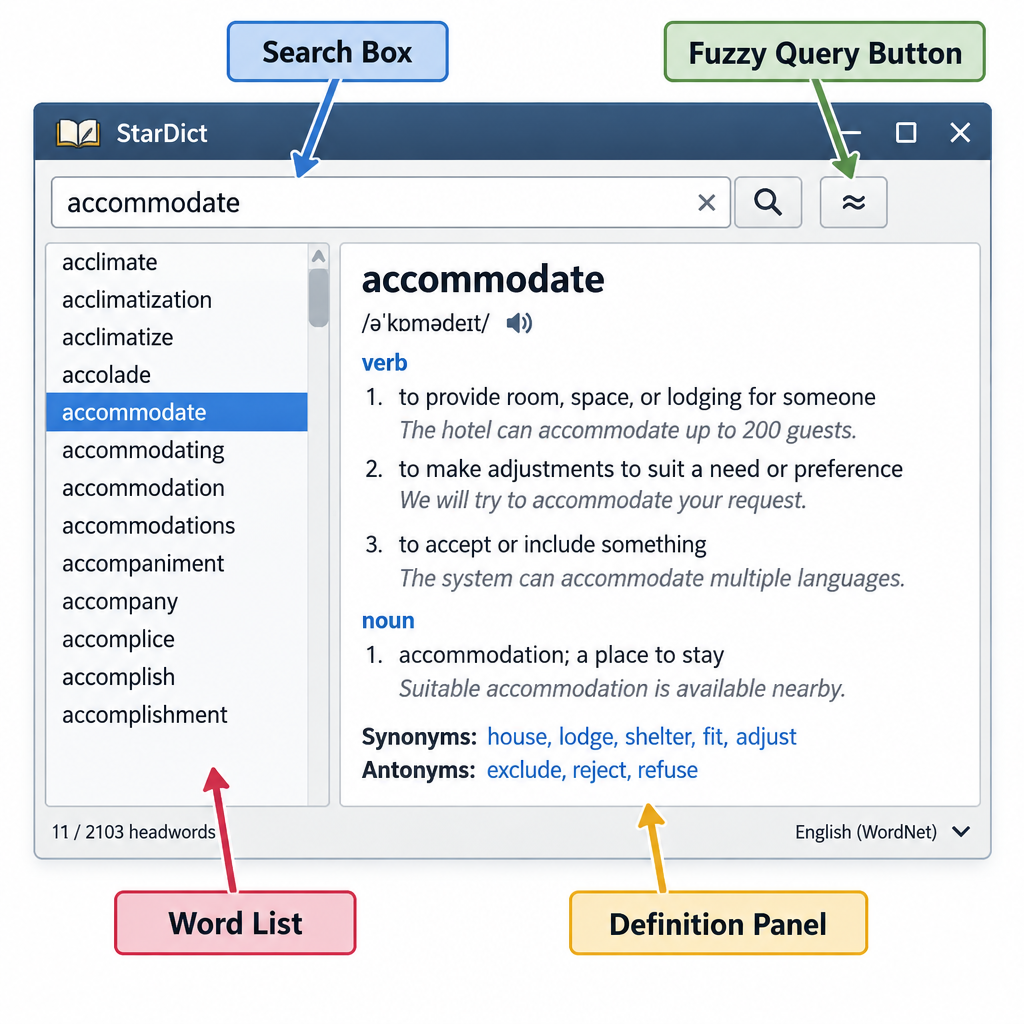
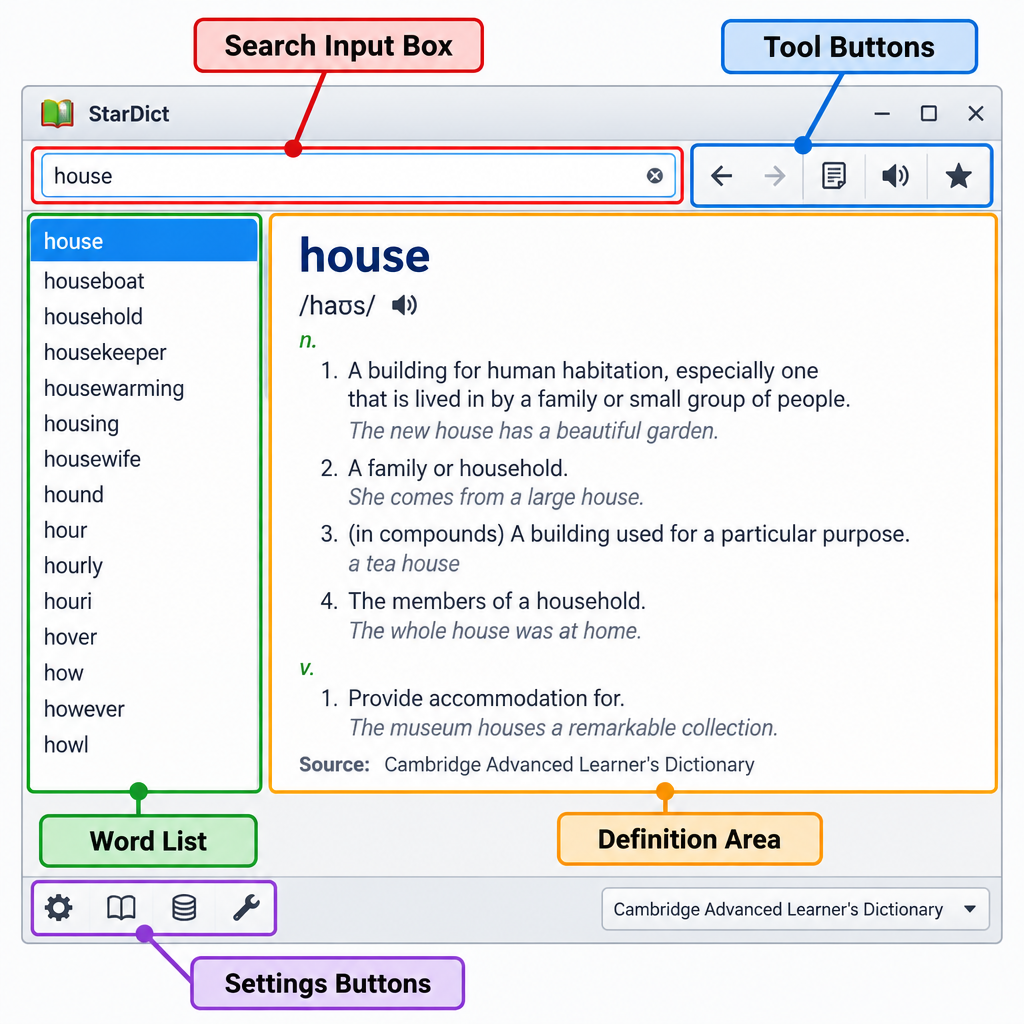
    The main window has a search box at the top, a word list on the left and a definition area on the right. A row of tool buttons sits between them. StarDict’s own manual lists these parts:

    1. Search entry. You type a word or phrase here. The drop-down remembers earlier queries.
    2. Tool buttons. These run a fuzzy query (for misspelled words), go back to earlier lookups, move to the previous or next word in the list, and open the main menu. In the 3.0.7 manual, right-clicking “Go Back” shows a list of words you looked up earlier.
    3. Word list. This shows the headwords that match your search, in alphabetical order.
    4. Results list. In 3.0.x, this shows which installed dictionaries contain the word.
    5. Definition area. This shows the entries from every dictionary that matched, one after another.
    6. Setting buttons. These open the preferences and the dictionary manager.

    Scan mode and the notification-area icon

    Scan mode lets StarDict look up a word you select in another program and show the result in a small floating window. The manual describes a notification-area icon that controls it. Middle-clicking the icon looks up the selected word, and Ctrl-clicking it turns Scan selection on or off. These details come from the GNOME help files. The Windows build uses the same idea, but the exact clicks can differ between versions.

    Dictionary files and their structure

    Every StarDict dictionary is a set of files that share one base name and sit in the same folder. The format documentation lists them:

    File Required What it holds
    .ifo Yes Plain-text information: title, word count, author, and a version line that must read 2.4.2 or 3.0.0
    .idx or.idx.gz Yes Sorted index of headwords, each pointing to its definition
    .dict or.dict.dz Yes The definitions themselves..dz is a compressed form that still allows random access
    .syn No Synonyms and alternative forms that point back to headwords
    .tdx Only for tree dictionaries Used instead of.idx for dictionaries with a tree layout

    StarDict opens the.ifo file first and then looks for the matching index and data files beside it. All text should be in UTF-8. A dictionary called “example” therefore needs at least example.ifo, example.idx and example.dict.dz in the same folder.

    The program folder on Windows

    On older Windows installs, StarDict kept dictionaries in a subfolder called dic inside its install directory, usually C:\Program Files\stardict\dic. Each dictionary went in its own subfolder. The program folder also had a locale folder, where each language’s interface translation sat in an LC_MESSAGES subfolder as stardict.mo, and a skins folder for alternative looks. Each skin had its own subfolder with a name file and icon images.

    Paths can change between versions, so check the documentation that comes with the build you have. Also be careful with old dictionary packs from file-sharing sites. Some were unlicensed copies of commercial dictionaries, and that is one reason this page no longer points to any dictionary files.

    Project history

    StarDict started in China and became one of the best-known free dictionary programs of the 2000s. SourceForge removed the original project after copyright infringement reports about some of the dictionaries offered with it. Development moved to Google Code and later went back to SourceForge, and the source code is now on GitHub under huzheng001/stardict-3. Until about 2013 the stardict.org address carried the project’s website. That address now belongs to Star Dictionary, which is run by new, unrelated owners and has no connection to the software.

    Powered by

    FAQ

    Is this site the official StarDict website?

    No. Star Dictionary is an independent words and language reference that now uses the old stardict.org address. Hu Zheng and the other StarDict developers maintain the program on the project’s SourceForge pages and its GitHub repository. For releases and bug reports, go to those pages.

    Which files make up a StarDict dictionary?

    A StarDict dictionary needs three files: an.ifo information file, an.idx index (sometimes gzipped as.idx.gz), and a.dict data file (often compressed as.dict.dz). A.syn synonym file is optional. All the files must share one base name and sit in the same folder.

    Can other programs open StarDict dictionaries?

    Yes, and for many readers that is now the main use of the format. GoldenDict reads.ifo,.idx and.dict.dz sets on Windows and Linux, and KOReader uses StarDict dictionaries for word lookup on e-readers and Android. PyGlossary can convert other glossary formats to StarDict and back.

    Where can I find legal StarDict-format dictionaries?

    FreeDict publishes freely licensed bilingual dictionaries in StarDict format. Many open-source projects release their word lists under licences that allow reuse. Stay away from old dictionary packs of uncertain origin, because some of them copied commercial dictionaries without permission.

    Is StarDict still maintained?

    Yes, but not often. The 3.0.7 line appeared in October 2023, and Windows builds have tended to lag behind the Linux releases. If you need an actively updated dictionary app on Windows, GoldenDict is the usual alternative that reads the same files.

    Sources

    • StarDict project site (SourceForge)
    • StarDict file format documentation
    • StarDict, Wikipedia
    • StarDict 3.0.7 help manual (source mirror)
    • StarDict 2.4.10 Windows README (source mirror)
    • FreeDict downloads
    • PyGlossary StarDict documentation
  • When You Start StarDict

    When You Start StarDict

    StarDict is a free, open-source dictionary program. Its developers, led by Hu Zheng, look after it on their own project pages. Star Dictionary is an independent words and language reference and is not part of the StarDict project. This guide describes the program’s main window as it appeared in the old Windows manual. The project’s own homepage lists version 3.0.7, released in October 2023. If you only need the dictionary files, the StarDict format (.ifo,.idx and.dict files) also works in other readers such as GoldenDict and KOReader.

    About this page

    This page started as part of the old manual called StarDict Documentation (windows), in its Getting Started chapter. That manual was written for the StarDict 2.x and early 3.x releases on Windows. The layout below still matches the program’s classic design, but some buttons may look or behave a little differently in recent builds and on Linux.

    Item Details today
    Program StarDict, a cross-platform dictionary application
    Lead developer Hu Zheng, with contributors
    Latest version listed by the project 3.0.7 “MasterWork”, October 2023
    Later revision 3.0.7-2, January 2024, which moved the licence from public domain back to GPLv3
    Licence GPL
    Official information The project homepage on SourceForge and its source repositories on GitHub and GitCode
    Dictionary file format .ifo (information),.idx (index),.dict or.dict.dz (data), plus an optional.syn (synonyms)

    The StarDict main window

      
    (3.2)  

    StarDict Documentation (windows)

     > 
    Getting Started

     > 
    When You Start StarDict

    The StarDict window opens as soon as the program starts. It has five main parts, described below from top to bottom and left to right.

    Search input box

    Type the word you want to look up in this field. The field also has a drop-down list of the words you searched for recently, so you can go back to an earlier lookup without typing it again.

    Tool buttons

    The buttons next to the search box let you:

    1. Run a fuzzy query, which finds words close to the spelling you typed. This helps when you are not sure how a word is spelled.
    2. Go back to the word you looked up before.
    3. Move to the previous or next word in the word list on the left.
    4. Open the main menu.

    Word list

    The word list on the left shows the words StarDict found for your search. Click any entry to see its definition.

    Definition area

    The large pane shows the definition of the selected word. If several dictionaries are installed, StarDict shows the matching entry from each one in turn.

    Settings buttons

    At the bottom left of the window are the Scan selection checkbox, the Info button and the Quit button. When Scan selection is ticked, StarDict looks up any word you highlight in another application and shows the result in a small pop-up window.

    At the bottom right are the Internet search button, the project website button, the Dictionary management button and the Preferences button. In older versions, the website button opened the project’s website of that time. That old address no longer belongs to the StarDict project. Official information now lives on the project’s SourceForge homepage and its code repositories.

    A worked example: looking up a word

    StarDict Main Window Diagram

    A basic lookup takes four steps:

    1. Click in the search input box and type a word, for example “serendipity”.
    2. Press Enter. The word list fills with matching and nearby entries.
    3. Read the definition in the definition area on the right.
    4. If you typed “serendipty” by mistake, use the fuzzy query button. StarDict will suggest the correct spelling in the word list.

    The program’s documentation also describes glob-style pattern matching and full-text search. The full-text translation feature, added in later versions, sends whole passages to online translation services, so it needs an internet connection.

    Dictionaries and formats today

    StarDict reads dictionaries in its own file format. Each dictionary is a set of files that share one name. The.ifo file holds the title and other details. The.idx file is a sorted word index. The.dict file holds the definitions, and it is often compressed as.dict.dz. An optional.syn file lists synonyms and alternative forms. The project publishes the format specification, called StarDictFileFormat, alongside its source code.

    The format is now used well beyond StarDict itself:

    Program How it uses StarDict files
    StarDict Its native format
    GoldenDict Reads StarDict files, along with Babylon, Lingvo, DSL, Dictd and MDict
    KOReader Requires StarDict-format dictionaries for its built-in word lookup on e-readers
    sdcv A command-line lookup tool built around the StarDict format

    Not every StarDict dictionary circulating online is legal to use. Some older files were unlicensed copies of commercial dictionaries. Use free, openly licensed dictionaries, or dictionaries you have built yourself from licensed sources. If you need a trusted definition, the publishers’ own sites, such as Merriam-Webster, the Oxford dictionaries and the Cambridge Dictionary, remain the safer reference.

    FAQ

    Is this site the official StarDict website?

    No. Star Dictionary is an independent words and language reference and has no connection to the StarDict software project. Until about 2013, this web address hosted the program’s website. The developers now publish official information on their SourceForge homepage and their source repositories.

    What is the latest version of StarDict?

    The project homepage lists version 3.0.7, nicknamed “MasterWork”, released in October 2023. The project’s changelog also records a 3.0.7-2 revision in January 2024, which returned the licence to GPLv3. Linux distributions such as Debian, Ubuntu and Arch Linux package their own builds of the 3.0.7 series.

    What does Scan selection do in StarDict?

    When the Scan selection checkbox is ticked, StarDict watches for words you highlight in other programs, such as a browser or a word processor. It then shows the definition in a small pop-up window. Untick the box when you want to select text without triggering lookups.

    What is a fuzzy query?

    A fuzzy query finds dictionary entries whose spelling is close to what you typed, not only exact matches. It is useful when you only half-remember a word or are learning a language with unfamiliar spelling. The results appear in the word list, and you pick the right entry from there.

    Which programs can open StarDict dictionary files?

    Besides StarDict, GoldenDict and its successor GoldenDict-ng read StarDict files, and KOReader uses the format for dictionary lookup on e-readers and Android. The command-line tool sdcv reads them too. A typical dictionary has an.ifo, an.idx and a.dict or.dict.dz file, all with the same base name.

    Are StarDict dictionaries free to use?

    The program is free software, but each dictionary file has its own licence. Many openly licensed dictionaries exist. Some files shared in the past were copied from commercial dictionaries without permission. Check where a dictionary came from and what licence it carries before you rely on it.

    Sources

    • StarDict project homepage (stardict-4.sourceforge.net, English index page)
    • StarDict File Format specification (StarDictFileFormat, StarDict project)
    • StarDict 3.0.7 ChangeLog (huzheng_001 repository on GitCode)
    • StarDict article on Wikipedia
    • Debian and Ubuntu package pages for stardict 3.0.7
    • GoldenDict package description (Fedora Packages)
    • GoldenDict-ng dictionary formats documentation
    • KOReader wiki, dictionary support page
  • StarDict Documentation (Windows)

    StarDict Documentation (Windows)

    StarDict is a free, open-source dictionary program for Windows and Linux. Its main developer, Hu Zheng, still maintains it through the project’s own SourceForge homepage and GitHub repository. Star Dictionary is a separate words and language reference under unrelated ownership. It is not the StarDict project and does not distribute the program or its dictionary files. In November 2026, the newest StarDict release is 3.0.7 from October 2023, and the StarDict dictionary format (.ifo,.idx,.dict.dz) still works in other readers such as GoldenDict-ng.

    What the 2009 Windows documentation covered

    The original page, dated May 2009, was a help page for the Windows build of StarDict. This address hosted the program’s website until about 2013. The material below is kept as history, with dates and versions corrected where they have changed.


    (Top)  

    StarDict Documentation (windows)

    Table of contents:


    Created by: system.
    Last Modification: Wednesday 29 of April, 2009 06:10:16 MST by system.

    SourceHistorySimilar

    Login

    Back then, StarDict was a desktop dictionary built on the GTK+ toolkit. It looked words up in dictionary files stored on the user’s own computer. The Windows version installed like any other Windows program. It used the same dictionary file format as the Linux version, so one dictionary file could be used on both systems.

    Today the Windows story is less tidy. The project homepage still lists StarDict-3.0.1.2.exe as its Windows installer. Its Linux packages go up to 3.0.7. Release notes for the Windows build live on the developer’s pages, not here.

    How StarDict works on Windows

    StarDict looks words up as you type, and it can also translate words you select in other programs. The Linux packaging of the current release lists these core features: a pop-up translation when you select a word with the mouse, pronunciation, glob-style and fuzzy search, plugins, and a system-tray mode.

    Feature What it does Notes
    Scan selection Shows a pop-up translation of the word under your selection The feature most users installed it for
    Fuzzy search Finds close matches when you misspell a word Good for learners spelling by ear
    Glob-style search Matches patterns with wildcards such as * and ? Handy for crossword-style lookups
    Pronunciation Plays or shows how a word is said Depends on which dictionaries and sound files are installed
    Plugins Add-ons such as a character map and online lookups Which plugins are available varies by build and platform
    Tray mode Keeps the program running quietly in the notification area Lets scanning work in the background

    Search quality depends on the dictionaries installed. The program itself has no word list. Every definition comes from a dictionary file, so the results can only be as good, and as legally sourced, as that file.

    The StarDict dictionary file format

    A StarDict dictionary is a set of files that share one base name, such as somedict.ifo, somedict.idx and somedict.dict.dz. The official StarDict File Format document says the program finds the.ifo file first, then opens the index and data files with the same name in the same folder.

    File Required? Purpose
    .ifo Yes Plain-text information file. The first line must read “StarDict’s dict ifo file”, followed by a version line (2.4.2 or 3.0.0)
    .idx or.idx.gz Yes Sorted word index pointing into the data file. Can be gzip-compressed
    .dict or.dict.dz Yes The definitions themselves. The.dz version is dictzip-compressed
    .syn No Synonyms and alternate forms that point to existing entries. Supported from StarDict 2.4.8
    .idx.oft,.syn.oft No Cache files the program creates to load faster. Added in 2.4.8

    The spec recommends an uncompressed.idx with a compressed.dict.dz for new dictionaries. Numbers are stored in network byte order, and all text must be UTF-8. Version 3.0.0 of the.ifo format added the idxoffsetbits option, which allows 64-bit offsets for very large dictionaries.

    Because the format is documented and stable, it has outlived much of the original program’s popularity. Libraries in Rust, Go, Haskell and JavaScript read it. GoldenDict-ng lists StarDict alongside MDict, ABBYY Lingvo DSL, XDXF, Zim, Slob, DictD and Epwing, and its documentation points to PyGlossary for converting between formats.

    Dictionaries, licensing and history

    StarDict’s dictionary collection has a messy legal history, and that history is why this page carries no download links. Many files passed around under the StarDict name were unofficial conversions of commercial dictionaries, made without the publisher’s permission.

    • 2006: At the end of 2006, Hu Zheng cited personal financial problems and began charging users to download dictionary files. According to Wikipedia’s history of the project, this upset parts of the Linux community.
    • Removal from SourceForge: The project’s own pages later said the original SourceForge project had been removed after copyright infringement reports. Outside developers, including a 2012 Mageia mailing-list post and a Gentoo bug thread, noted that the specific reports were never documented in public.
    • Google Code and back: The project moved to Google Code and later returned to SourceForge under the name stardict-4.
    • Downstream clean-up: FreeBSD’s ports tree removed some StarDict dictionary packages over possible copyright problems.

    If you want legal word data, look for dictionaries with a clear free license, or use a publisher’s own app or website. Merriam-Webster, Oxford and Cambridge all run free online dictionaries.

    StarDict version history

    StarDict’s last major release was 3.0.7, which the developer called the “MasterWork” edition, in early October 2023. The changelog records a follow-up 3.0.7-2 on 4 January 2024 that moved the license back to GPLv3.

    Version Date Notes
    2.4.8 Before 2009 Added.syn synonym files and.oft cache files
    3.0.1.2 2000s Still the Windows installer listed on the project homepage
    3.0.6 27 January 2015 Long-running stable release. Ubuntu was still packaging it in 2019
    3.0.7 (MasterWork) Early October 2023 Current release. The homepage lists Win32 among supported systems
    3.0.7-2 4 January 2024 License returned to GPLv3

    Linux distributions now ship 3.0.7 builds taken from later source snapshots. Debian, for example, packages a version based on a September 2022 snapshot of the code.

    Credits on the original page

    The 2009 page ended with the credits for its hosting and site software:

    FAQ

    Is Star Dictionary the official StarDict website?

    No. Star Dictionary is an independent reference for word meanings, word origins, idioms and translations, and it has no connection to the StarDict software. The program’s official information is on its SourceForge homepage (stardict-4) and in Hu Zheng’s GitHub repository, stardict-3.

    Does StarDict still work on Windows?

    The project still lists Windows (Win32) as a supported system. However, the Windows installer on its homepage is version 3.0.1.2, which is much older than the 3.0.7 Linux release. If you want an up-to-date Windows program that reads StarDict files, GoldenDict-ng is the most widely used choice.

    What files make up a StarDict dictionary?

    You need at least three files with the same base name: an.ifo information file, an.idx index and a.dict data file. The index can be gzip-compressed, and the data file can be dictzip-compressed (.dict.dz). A.syn file for synonyms is optional.

    Are StarDict dictionaries legal to use?

    That depends on the dictionary. The format itself is open, but many files shared online were unlicensed copies of commercial dictionaries, which is why some were taken down. Use dictionaries with a stated free license, or the publisher’s own app or website.

    Can StarDict files be converted to other formats?

    Yes. GoldenDict-ng’s documentation recommends PyGlossary, an open-source tool that converts between StarDict and many other dictionary formats. Converting a dictionary does not change its license, so the copyright rules above still apply.

    Who develops StarDict?

    Hu Zheng is the main developer, and other contributors have helped over the years. Linux distributions such as Debian and Ubuntu maintain their own packages of the program. Bug reports and release notes belong on the project’s own pages.

    Sources

    • StarDict project homepage (SourceForge, stardict-4)
    • StarDict File Format specification
    • StarDict 3.0.7 ChangeLog (GitCode mirror of the developer’s repository)
    • StarDict article, Wikipedia
    • GoldenDict-ng supported dictionary formats
    • stardict source package, Ubuntu Launchpad
  • StarDict Q & A

    StarDict Q & A

    StarDict is a free, open-source dictionary program created by Hu Zheng. It is still maintained by its own developers on SourceForge and GitHub, and its latest stable release, 3.0.7.1, came out on 2 October 2023. Star Dictionary is an independent words and language reference that has no connection to the StarDict project and cannot help with installing or troubleshooting it. If you want offline dictionaries today, the StarDict file format is still widely supported by programs such as GoldenDict-ng, KOReader and sdcv. The project’s own pages are the official source for the program.

    About the StarDict program

    StarDict is a desktop dictionary program, sometimes called a dictionary shell. It does not contain word lists of its own. Instead, it opens separate dictionary files and lets you look up words in all of them at once. According to Wikipedia, it is released under the GPL-3.0-or-later license and is the successor of StarDic, an earlier program by Ma Su’an, whose version numbering it kept.

    Who develops StarDict

    Hu Zheng (胡正) leads the project. Hosting has moved several times:

    1. The project started on SourceForge.
    2. It was later removed from SourceForge after copyright infringement reports. The dictionary files hosted there were removed too, and some of those files were unlicensed copies of commercial dictionaries.
    3. Development then moved to Google Code, with the address stardict.org as its website. That arrangement is now history: Google Code has shut down, and stardict.org now belongs to this unrelated reference site.
    4. Today the project has a site on SourceForge again, and its source code is on GitHub in the stardict-3 repository.

    Which version is current

    According to Wikipedia, the latest stable release is 3.0.7.1, dated 2 October 2023. The project’s changelog also describes a 4.0.0 build that ports the program to the GTK 4 toolkit, with code that is “almost the same as StarDict-3.0.7”. The project’s own SourceForge and GitHub pages are the place to check for anything newer.

    A dated controversy

    At the end of 2006, Hu Zheng began charging users to download dictionary files from his website, citing personal financial problems. Wikipedia records this as a controversy at the time. It is part of the project’s history, not how the program works today.

    How StarDict dictionary files work

    A StarDict dictionary is a folder of small files that belong together. The format specification, published on the project’s SourceForge site, describes each file’s role.

    File Required? What it holds
    .ifo Yes Plain-text information: dictionary name, word count, format version (2.4.2 or 3.0.0)
    .idx or.idx.gz Yes The sorted word list, with the position and size of each entry
    .dict or.dict.dz Yes The definitions themselves;.dict.dz is compressed with dictzip
    .syn No Synonyms and alternate forms that point to main entries

    The specification recommends that dictionary makers use the uncompressed.idx with the compressed.dict.dz. Strings are stored as UTF-8 text, so one file can hold any script, from Latin to Chinese to Arabic. The.ifo file is the one programs look for first. It is the file you point a converter or reader at.

    Using StarDict-format dictionaries today

    You do not need the StarDict program itself to use dictionaries in its format. Several actively maintained programs read StarDict files, often alongside other formats.

    Program Type Formats it reads
    GoldenDict-ng Desktop dictionary program StarDict, MDict (.mdx/.mdd), ABBYY Lingvo DSL, XDXF, Zim, Slob, DictD, Epwing
    KOReader E-reader app StarDict (.ifo,.idx,.dict or.dict.dz)
    sdcv Command-line tool StarDict
    PyGlossary Converter Reads and writes StarDict, plus Babylon BGL, Tabfile, XDXF, Zim and many others

    GoldenDict-ng’s own documentation suggests PyGlossary for converting between formats. sdcv, described in its manual as the console version of StarDict, finds dictionaries through the STARDICT_DATA_DIR environment variable.

    Choosing dictionaries responsibly

    The format is neutral, but the files are not. Many StarDict dictionaries passed around online in the 2000s were copies of commercial dictionaries made without permission. Choose dictionaries whose license is stated clearly, such as projects built from freely licensed data. For an authoritative definition of a single word, established publishers such as Merriam-Webster, Oxford and Cambridge publish their own dictionaries online.

    FAQ

    Is stardict.org the official StarDict website?

    No. Until about 2013 the address carried the StarDict project’s website, but it now belongs to Star Dictionary, an unrelated words and language reference. The program’s developers publish official information on the project’s SourceForge site and its GitHub repository.

    Is StarDict still being developed?

    Yes, slowly. Wikipedia lists 3.0.7.1, released on 2 October 2023, as the latest stable version. The project changelog also describes a GTK 4 port numbered 4.0.0.

    What is the difference between.dict and.dict.dz?

    Both hold the definitions. A.dict.dz file is compressed with dictzip, which keeps the file smaller but still lets a program jump straight to one entry. The StarDict specification recommends.dict.dz for published dictionaries.

    Which programs can open StarDict dictionaries?

    GoldenDict-ng on the desktop, KOReader on e-readers and sdcv on the command line all read the StarDict format. PyGlossary can convert StarDict files to and from many other dictionary formats.

    Why were StarDict dictionaries removed from SourceForge?

    The project’s former SourceForge page said the removal followed copyright infringement reports. Some of the dictionary files that circulated with StarDict were unlicensed copies of commercial dictionaries. Some users later questioned the explanation, but the safe choice is still to use only dictionaries with a clear license.

    Can Star Dictionary help with StarDict installation problems?

    No. This site explains word meanings, word origins, idioms and translations, and it has no part in developing StarDict. For questions about the program, use the issue tracker and documentation on the project’s own GitHub and SourceForge pages.

    Sources

    • StarDict, Wikipedia
    • StarDict project home page, stardict-4.sourceforge.net
    • StarDict File Format specification, stardict-4.sourceforge.net
    • StarDict project notice on its removal from SourceForge, stardict-4.sourceforge.net
    • StarDict changelog (stardict-4.0.0 source mirror), gitcode.com
    • GoldenDict-ng dictionary formats documentation, xiaoyifang.github.io
    • sdcv manual page, Arch Linux
    • KOReader dictionary support wiki
    • PyGlossary project page, PyPI
  • StarDict News and FAQ: Collation and Account Levels

    StarDict News and FAQ: Collation and Account Levels

    StarDict is a free, open-source dictionary program for computers. Its original author, Hu Zheng, still develops it, but not here: this site, Star Dictionary, is an independent reference for word meanings, origins, idioms and translations, and has no connection to the StarDict project. The last release is version 3.0.7, nicknamed “MasterWork,” from October 2023. The project’s official information is on its SourceForge site (the stardict-4 project) and in its GitHub repository. Today, StarDict-format dictionaries also work in other programs such as GoldenDict and the e-reader app KOReader, and FreeDict publishes openly licensed dictionaries in the format.

    Old StarDict.org frequently asked questions

    The two answers below come from the time when this address was the StarDict program’s website, which lasted until about 2013. They have been rewritten in plain English and corrected where needed. They describe how the program and the old site worked, not anything this site offers.

    ,

    What does the collate function do?

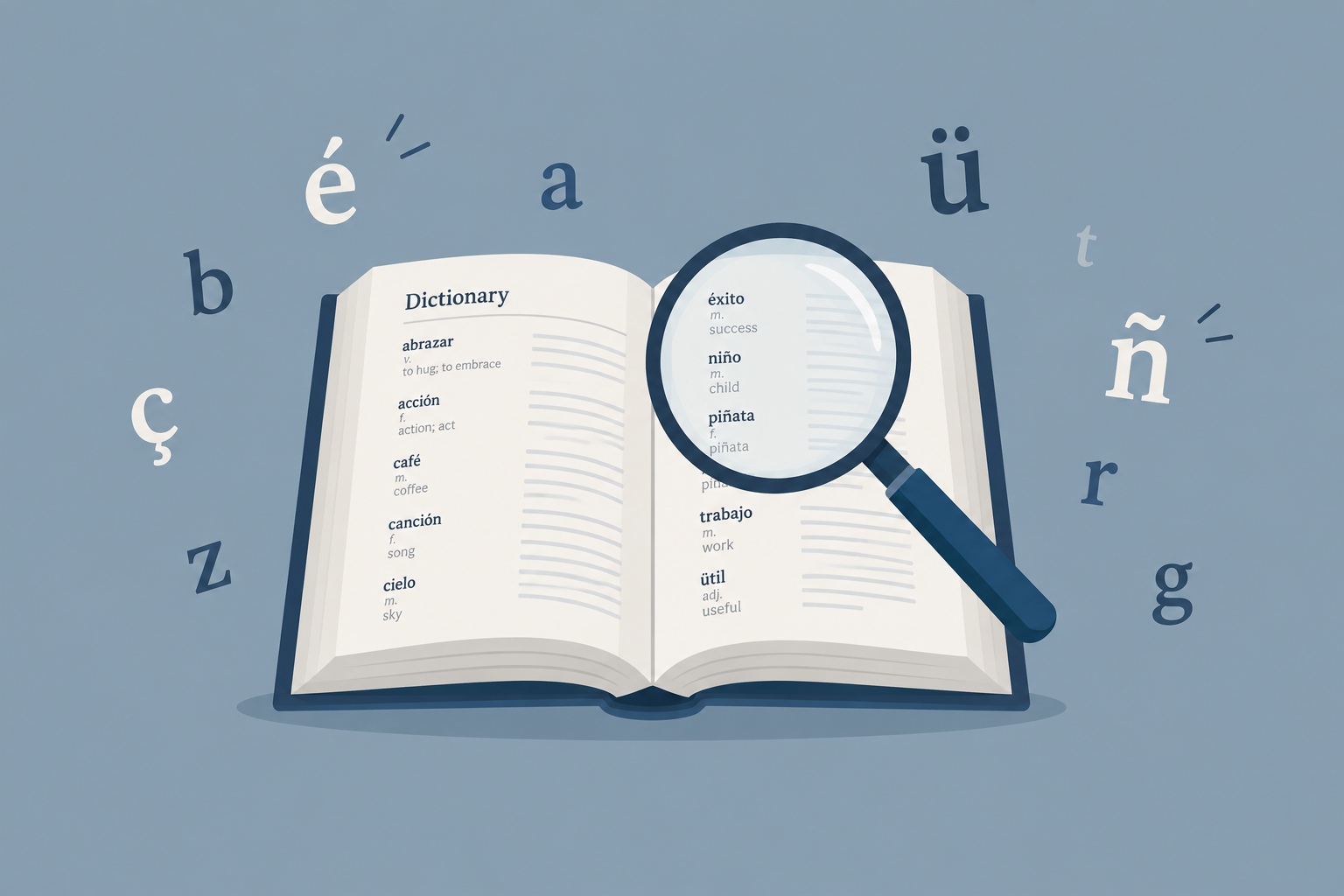
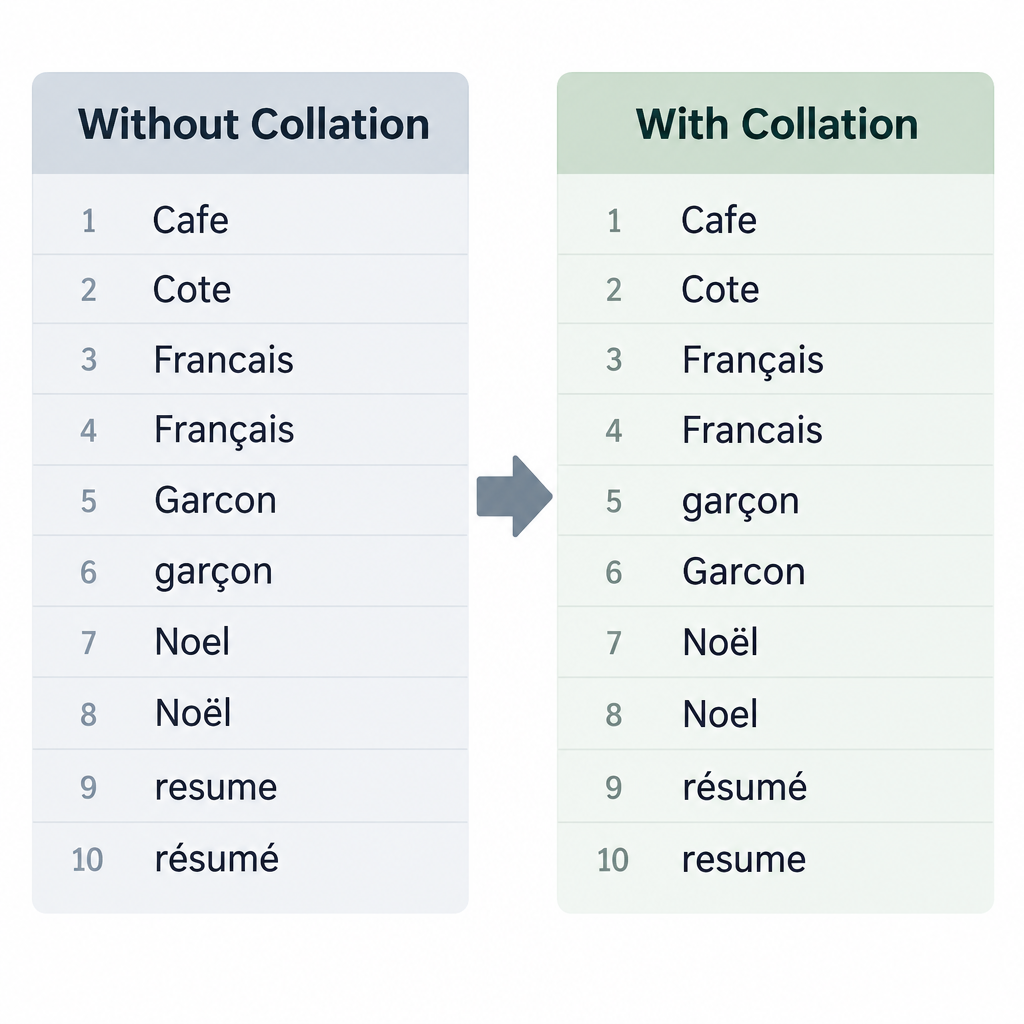
    The collate function sorts a dictionary’s word list using the alphabet rules of a particular language, not just the basic English (ASCII) order. Without it, StarDict sorts words by comparing ASCII letters without regard to case. Letters with accents, like “ç,” then end up in places a speaker of that language would not expect.

    This matters because when the exact word you type is not in the dictionary, StarDict shows the closest word that comes after it in the list. With collation turned on, those near matches are better. For example, typing “Francais” without the cedilla can find “Français.”

    Some details from the project’s own documentation:

    1. Collation support arrived in StarDict 2.4.8.
    2. In the program, you choose a collation function in the Preferences dialog under Dictionary, then Cache.
    3. After you change the collation function, the dictionary has to be reloaded.
    4. StarDict saves the sorted order in cache files with the extensions.idx.clt and.syn.clt, so it does not have to sort the list again on every start.

    Collation helps most with languages whose alphabets go beyond plain A to Z. One user with Romanian word lists noted that without it, the program cannot sort words in Romanian alphabetical order.

    How could users upgrade their account level? (history)?

    This answer is history only. The old StarDict.org site offered account levels, and users could upgrade theirs by paying through a section of the site called the Finance Center. Users could also earn an upgrade by contributing to the project. Examples included accepting the site’s invitation to “help us translate” the website, adding more dictionaries, or joining StarDict development.

    That account system closed with the old site. Accounts, payments and account levels do not exist at this address today. Anyone who wants to contribute to StarDict now does so through the project’s own channels, such as its GitHub repository and issue tracker.

    Help with the StarDict program today

    StarDict’s developers keep the official documentation and source code on SourceForge and GitHub. The program runs on Linux, FreeBSD, Solaris and Windows. Version 3.0.7 moved it to GTK3, and its 2023 to 2024 changelog shows that the license briefly changed to public domain before going back to GPLv3.

    The dictionary format is just as important as the program. A StarDict dictionary is a set of files that share one base name:

    File What it holds Notes
    .ifo Basic information about the dictionary Plain text; the version field is “2.4.2” or “3.0.0”
    .idx or.idx.gz The sorted word list, with the position of each entry If the word list is in the wrong order, StarDict will not work properly
    .dict or.dict.dz The definitions themselves .dz files use dictzip, a form of gzip that allows jumping to any point in the file
    .syn (optional) Synonyms that point to entries in the index Gets its own.syn.clt cache when collation is on

    Text in these files must be UTF-8, and numbers are stored in network byte order. Because the format is well documented, GoldenDict, KOReader and many smaller apps and code libraries can read it.

    One warning applies. In the past, some StarDict-format dictionaries passed around online were unlicensed copies of commercial dictionaries. If you want dictionary files for a reader app, choose openly licensed sources such as FreeDict, or use the official Merriam-Webster, Oxford and Cambridge dictionaries through their own websites and apps.

    FAQ

    StarDict Collation Sorting Diagram

    Is this site the official StarDict website?

    No. Star Dictionary is an independent reference for words and language, run by new owners who have no link to the StarDict project. The program is still developed by Hu Zheng and other contributors, and its official pages are on SourceForge and GitHub.

    Is StarDict still being developed?

    Yes, though updates are slow. Version 3.0.7 “MasterWork” came out on 3 October 2023 according to the project’s changelog, and a follow-up revision in January 2024 changed the license back to GPLv3. Linux distributions such as Debian still ship StarDict packages built from the 3.0.7 code.

    What is a collation file in StarDict?

    A collation file is a cache that stores a dictionary’s word list sorted by the rules of a particular language. StarDict creates it as an.idx.clt file, plus a.syn.clt file if the dictionary has synonyms. If you switch the collation function, the dictionary has to be reloaded before the new order takes effect.

    Which programs can open StarDict dictionaries?

    StarDict can, of course, and so can GoldenDict on the desktop and KOReader on e-readers and phones. FreeDict lists StarDict as one of its main download formats because so many devices support it. Code libraries in Go, Rust, Haskell and JavaScript can read the files too.

    Can I still use my old StarDict.org account?

    No. The account levels, the Finance Center and contributor upgrades were all part of the program’s old website, which closed around 2013. This site has no user accounts from that period and cannot recover them.

    Are all StarDict dictionary files legal to use?

    No. The format itself is open, but some files shared online in the past were copied from commercial dictionaries without permission. Openly licensed collections such as FreeDict, or the publishers’ own products, are the safe choice.

    Sources

    • StarDict official site (stardict-4 project on SourceForge), English index page
    • StarDict File Format documentation (stardict-4.sourceforge.net)
    • StarDict 3.0.7 ChangeLog (Hu Zheng’s source repository mirror on GitCode)
    • StarDict source code, stddict.h (collation modes)
    • StarDict, Wikipedia
    • FreeDict downloads page
    • GoldenDict package description, Fedora Packages
    • Debian/PureOS stardict package listing (3.0.7)